
The first article in the series laid the foundations for an open-source residential EMS with Home Assistant and NodOn Zigbee products. The second article showed how to measure energy flows precisely with the SEM-4-1-00. The third article explained how to use this data to optimize photovoltaic self-consumption.
This fourth and final article gets practical: how to control a water heater with the SIN-4-1-21 to directly convert solar surplus into hot water? Pascal Stephany shares his hands-on experience.
The complete series:
- Building a Residential EMS with Home Assistant and NodOn Zigbee Products
- Measuring Energy Flows with the SEM-4-1-00: The First Step Towards a Smarter Home
- Optimizing Photovoltaic Self-Consumption with Home Assistant and NodOn Zigbee Solutions
- Controlling a Water Heater with the SIN-4-1-21: Turning Solar Surplus into Hot Water
Controlling a Water Heater with the SIN-4-1-21: Turning Solar Surplus into Hot Water
Article 4/4 of the series "Residential EMS by Pascal Stephany"
What if your water heater became your first energy battery?
When installing solar panels, part of the electricity produced is often injected into the grid for lack of immediate consumption. Yet this energy can be put to better use.
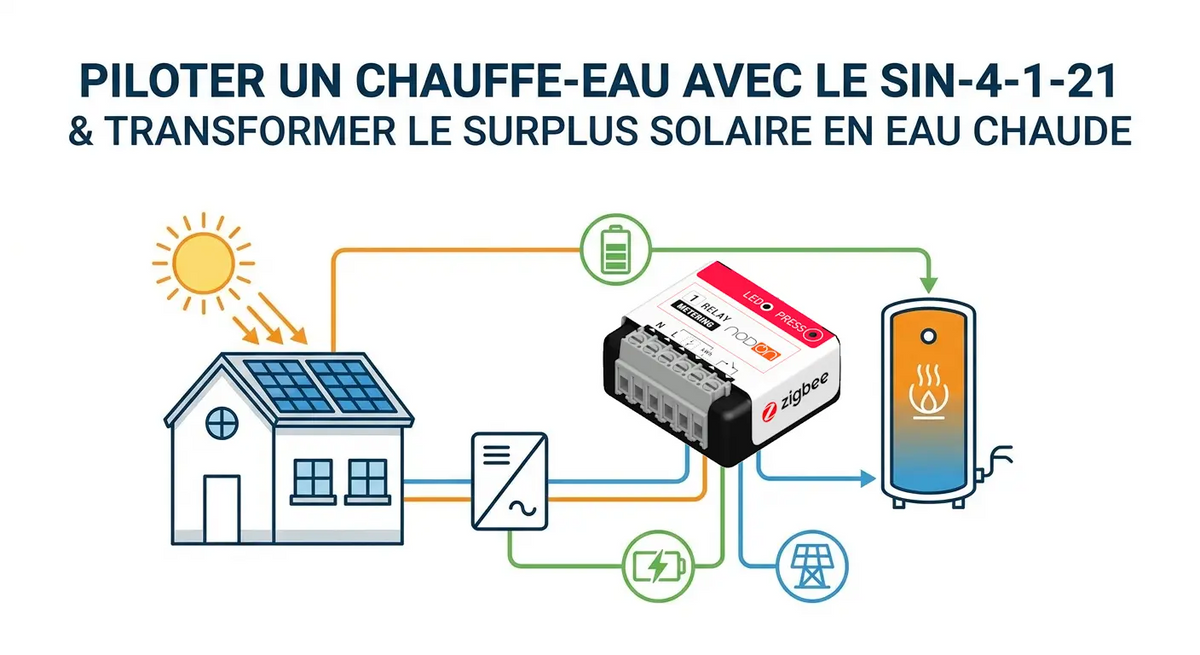
One of the simplest and most cost-effective solutions is to use the photovoltaic surplus to produce domestic hot water. Thanks to Home Assistant and NodOn's SIN-4-1-21, it becomes possible to automate this management and significantly increase self-consumption.
The Water Heater: an Underestimated Thermal Battery
Unlike an electric battery, a hot water tank stores energy as heat. Every kilowatt-hour used to heat water is a kilowatt-hour that won't need to be purchased later from the grid.
Even before investing in a storage system, optimizing water heater operation is therefore one of the best levers for making the most of photovoltaic production.
Smart Control with the SIN-4-1-21
The SIN-4-1-21 is a Zigbee multifunction module that combines switching and consumption metering. Installed on the water heater's power supply or control circuit, it allows Home Assistant to:
- automatically control the tank's operation (3,000 W max);
- measure the power consumed;
- track energy usage;
- integrate this data into energy dashboards.
The module thus becomes a genuine player in the home's energy strategy.
For an independent review of the SIN-4-1-21, see this detailed review by Smart Home Assistant.

The Intelligence Comes from Home Assistant
In my installation, the water heater is never controlled on a simple time schedule. Home Assistant constantly analyses several metering inputs (SEM-4-1-00):
- photovoltaic power produced;
- instantaneous household consumption;
- power injected into the grid;
- battery state of charge;
- other priority appliances.
When conditions are met, the system automatically decides to allow water heating. Conversely, if the surplus disappears or a priority appliance starts up, the water heater can be stopped to preserve the home's energy balance.
An Evolving Optimization Logic
The advantage of an open solution like Home Assistant is the ability to adapt rules to suit needs. A few example scenarios:
- heat only when surplus exceeds a certain power level;
- suspend heating if a battery is being charged;
- avoid any operation during peak consumption hours;
- automatically restart the water heater if the water hasn't reached its minimum temperature by end of day.
Each installation can thus define its own self-consumption strategy.
Measure to Optimize
Consumption monitoring is just as important as control. Thanks to measurements from the SIN-4-1-21 and the SEM-4-1-00 energy meters, it becomes possible to visualize:
- the water heater's instantaneous power;
- energy consumed each day;
- the share covered by photovoltaic production;
- the impact on overall self-consumption.
These indicators allow automations to be progressively fine-tuned to make the most of every sunny day.

Seamless Integration in Home Assistant
The SIN-4-1-21 communicates over Zigbee and integrates easily into Home Assistant via Zigbee2MQTT or ZHA. It then becomes an additional building block in an energy management system capable of communicating with:
- energy meters;
- home batteries;
- photovoltaic inverters;
- EV charging stations;
- other connected appliances.
This open approach offers great freedom to evolve the installation over time.
My Experience
In my installation, the water heater is treated as a virtual thermal battery. Combined with Home Assistant and the SIN-4-1-21, it absorbs part of the photovoltaic surplus before it is even injected into the grid.
This strategy not only improves the self-consumption rate, but also reduces the strain on electric batteries when solar production is abundant.
In my 2-person household, the "BECS" water heater is a 150 L tank and its element consumes around 1,600 W. Its energy consumption is approximately 2.5 kWh/day, meaning 2 h of priority routing when my surplus exceeds 1,500 W.
In winter or when conditions don't provide sufficient photovoltaic surplus, the water heater switches to forced operation during Off-Peak Hours. This strategy allows me to ensure hot water above 55 °C all year round.
Ultimately, the hot water produced during the day becomes stored energy… which will be used several hours later, without consuming a single watt from the grid.
Key Takeaways
✔ The water heater is a thermal battery that stores solar energy as heat, with no additional investment.
✔ The SIN-4-1-21 allows simultaneous control and metering of the water heater's consumption.
✔ Home Assistant analyses photovoltaic production in real time to automatically decide when to heat water.
✔ The automation logic is fully customizable to suit each installation's needs.
✔ Every kWh used to heat water is a kWh that won't be purchased from the grid.
✔ The whole system relies on an open, interoperable and scalable Zigbee ecosystem.
Products Used
- SIN-4-1-21 – Zigbee Multifunction Relay Switch with Metering
- SEM-4-1-00 – Zigbee Smart Energy Monitor
 eHome Labs
Passionate about home automation for over 20 years, I evolve my installation in step with my experiments and new technologies. Each automation is tested in real conditions before being adopted daily, making this installation a true life-size laboratory.
This approach allows me to continuously refine the home's energy strategy and fully exploit the possibilities offered by Home Assistant and NodOn Zigbee solutions.



Leave a comment
This site is protected by hCaptcha and the hCaptcha Privacy Policy and Terms of Service apply.